Estimates the number of services you can run on a server based on best practice.
Platform: esri/ArcGIS
Works With: ArcGIS Enterprise
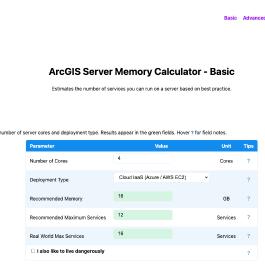
Description
This calculator estimates the number of services you can run on a server based on best practise.
How the Basic calculator works
The Basic calculator applies Esri best-practice rules of thumb directly to your core count.
OutputFormulaBasisMemoryCores × 4 GB (physical/cloud) or × 5 GB (on-prem VM), rounded to 8 GB
Esri recommendation. +1 GB/core for on-premises VMs covers hypervisor headroom. Cloud IaaS providers (Azure, AWS) guarantee dedicated memory so no overhead applies.
Recommended Max ServicesCores × 3~4 ArcSOC instances per core (Esri Architecture Center). At default min=1/max=2 instances, 3 services × 1.33 avg instances ≈ 4 per core.
Real World Max ServicesCores × 4All services loaded at minimum 1 instance each. Optimistic - assumes no service ever scales to max instances.
I like to live dangerously
Enabling this mode assumes only a percentage of services are active at any one time - the rest have zero running instances. This allows you to configure significantly more services on the same hardware.
ConcurrencyServices (4 cores)Conservative (best practice)1250% concurrent3225% concurrent6410% concurrent160
The risk: When a request hits a service with zero instances, ArcGIS Server must cold-start an ArcSOC process. This can take several seconds to over a minute depending on the service's data and complexity. Requests during this startup window will queue or fail. This approach is only appropriate for services with tolerant response time requirements and highly predictable, low-concurrency load.
Ratings & Reviews
This listing hasn't received any reviews yet.
219 views since 2026-03-26 19:43:53