Estimates the amount of memory required on a server
Platform: esri/ArcGIS
Works With: ArcGIS Enterprise
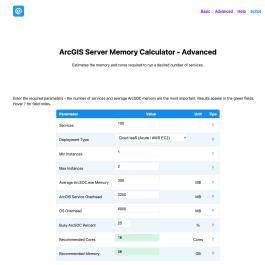
Description
This calculator estimates the amount of memory required on a server to run the desired number of services.
The Advanced calculator models the actual ArcSOC process lifecycle to derive memory and core requirements from your service count and configuration.
How the Advanced calculator works
The Advanced calculator models the actual ArcSOC process lifecycle to derive memory and core requirements from your service count and configuration.
Memory model
Memory is calculated from all ArcSOC processes that are loaded in RAM - including idle ones:
Loaded instances = (min_instances × (services + system_services)) + (busy% × loaded instances × (max - min)) ← burst Memory = OS overhead + ArcGIS overhead + (loaded instances × ArcSOC memory per instance)Idle ArcSOC processes (at minimum instances) consume RAM even when not serving requests. This is the key difference from CPU - RAM is always consumed, CPU is only consumed under load.
Cores model
Cores are calculated only from instances actively consuming CPU at peak concurrency:
CPU-active instances = busy% × (services + system_services) × max_instances Cores = CPU-active instances ÷ 4 instances/core (rounded up to nearest 4 for Esri licensing)Idle min-instance ArcSOC processes sit in RAM but consume negligible CPU. Sizing cores to all loaded instances would over-provision significantly.
System services
ArcGIS Server starts approximately 6 system ArcSOC processes by default (CachingTools, PublishingTools ×2, SyncTools, ReportingTools, SceneCachingTools). These are included in the calculation and cannot be disabled on a standard installation.
Min Instances = 0
Setting minimum instances to 0 means no ArcSOC processes are pre-loaded. Memory drops significantly - only services actively handling requests consume RAM. The calculator treats the busy percentage as the fraction of services that are hot (loaded) at any given time.
The trade-off is cold-start latency on the first request to any idle service. This is appropriate for infrequently-used services where response time is not critical.
Ratings & Reviews
This listing hasn't received any reviews yet.
195 views since 2026-03-26 19:45:00